



"

Business Location:

India

Business Size:

Startup

Industry:

Food and Services

So what we did for them?

Services Provided

AI Development

Build intelligent solutions with machine learning, automation, and predictive analytics to enhance business efficiency.

Digital Transformation

Modernize operations with cloud, automation, and AI-driven solutions for seamless business growth.

IT Consulting Services

Provide expert guidance on IT strategies, system optimization, and technology implementation to drive innovation.

Mobile App Development

Design and develop high-performance mobile applications for iOS and Android with seamless user experiences.

Who are they?

What is Tomato IVR?

Tomato is a food and beverage company with a specific objective of improving customer service by automating the handling of calls. The company had experienced a volume of customers inquiring about orders, general questions, and complaints that were way too enormous to be handled practically by traditional customer service management. A key strategic objective of Tomato was to implement an Interactive Voice Response (IVR) system as it would ease operations, enhance customer experience, and minimize human intervention.


So what is wrong with this industry ?

What are the Challenges in the Food and Service Industry

Order Accuracy

Inconsistent manual handling of high-volume orders leaves room for more possibilities of errors related to customer trust and repeat business.

Supply Chain Coordination

Perishable goods that have to be replenished in a timely manner do not give much flexibility in coordinating suppliers since the inventory levels can not be maintained on a consistent basis.

Operational Costs

Rising operational expenses, including labor and utility costs, pressure businesses to find efficient solutions to maintain profitability without compromising service quality.

Customer Retention

In a highly competitive environment, businesses face difficulties in retaining customers through experience and loyalty over successive visits.


so how did we handle that ?

Colladome’s Project Management Process

1

Requirement Analysis

Identified key challenges in handling high call volumes, order inquiries, and customer complaints.

2

IVR Flow Design

Developed a structured voice menu with self-service options for seamless customer interactions.

3

System Integration

Connected the IVR system with CRM, order tracking, and inventory databases for real-time updates.

4

Deployment & Training

Implemented the IVR solution and trained staff on monitoring and managing system operations.

5

Testing & Optimization

Conducted rigorous testing to ensure accurate call routing, voice recognition, and system stability.

6

Continuous Improvement

Monitored performance metrics, gathered customer feedback, and refined features for enhanced efficiency.

what and how to code ?

Technology Stack

Node.js

Employed for server-side operations, ensuring scalable backend performance through non-blocking architecture and real-time processing.

Asynchronous Event Handling:  Efficiently manages multiple concurrent requests, enhancing backend reliability.

Server-Side Rendering (SSR): Improves initial page loading times for a better user experience.

Scalable Backend Operations: Supports increasing user demand with reliable performance and scalability.

Real-Time Processing: Manages concurrent client requests efficiently, enhancing real-time application responsiveness.

Python

Python powers Proton Chatbot’s AI, enabling seamless data processing and integration.

Robust Frameworks: Uses Flask/Django for efficient backend processing and API development.

Scalability & Performance: Handles high-volume data requests with optimized query execution.

Natural Language Processing: Integrates AI-based algorithms for query comprehension and contextual understanding.

Efficient Data Handling: Facilitates real-time responses, database interactions, and advanced query processing.

React.js

Utilized for efficient frontend development, improving UI responsiveness and rendering speed through reusable components and virtual DOM implementation.

Dynamic User Interfaces: React delivers highly interactive, responsive user experiences with minimal lag.

Virtual DOM:  Reduces unnecessary re-rendering, enhancing overall frontend performance and efficiency.

Component-Based Architecture: Enables modularity, improving maintainability and code reuse across multiple parts of the application.

Improved Rendering Speed: Optimizes UI responsiveness, leading to faster and smoother user interactions.

so how does it look ?

Solution

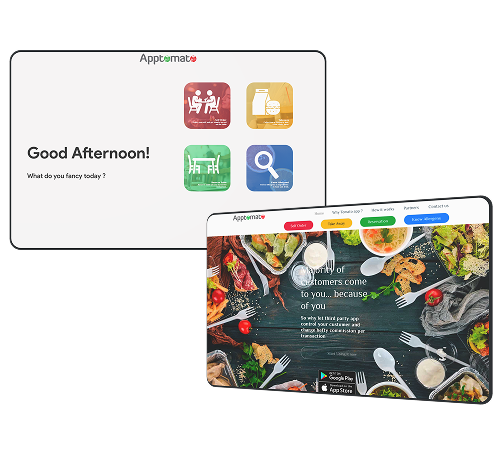
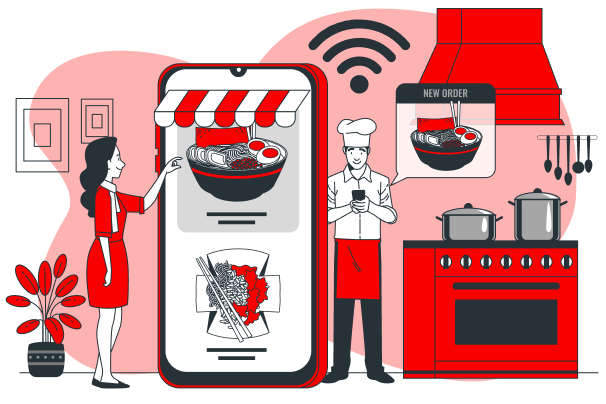
The user interacts with the system to browse the menu, place orders, customize meals, track order statuses, and make secure payments via the IVR or mobile app.

  • Order Placement:  Easily place orders through the IVR or mobile app, making the process fast and convenient.
  • Menu Browsing: Explore the restaurant’s offerings, view item descriptions, and choose meals from an intuitive digital menu.
  • Order Customization: Customize meals to suit individual preferences, including adding special instructions or modifying ingredients.
  • Payment Processing: Make secure and easy payments directly through the system, offering multiple payment options.
  • Real-Time Order Tracking: Receive real-time updates on the status of orders, from preparation to delivery.

The admin manages the overall operations of the IVR system, including monitoring order statuses, managing the menu, tracking performance, and ensuring efficient order fulfillment.

  • Order Management: Monitor and manage all customer orders in real-time, ensuring timely processing and fulfillment.
  • Menu Management: Easily update or adjust menu items and prices to reflect real-time changes in offerings or inventory.
  • Performance Tracking: Continuously monitor system performance, gather insights, and optimize operations based on customer interactions and feedback.
  • Inventory Tracking: Track product usage and stock levels to ensure adequate supplies for fulfilling orders.
  • Notification System: Receive real-time alerts on order processing, issues, or system performance to address concerns proactively.

The admin manages the overall operations of the IVR system, including monitoring order statuses, managing the menu, tracking performance, and ensuring efficient order fulfillment.

  • Order Management: Monitor and manage all customer orders in real-time, ensuring timely processing and fulfillment.
  • Menu Management: Easily update or adjust menu items and prices to reflect real-time changes in offerings or inventory.
  • Performance Tracking: Continuously monitor system performance, gather insights, and optimize operations based on customer interactions and feedback.
  • Inventory Tracking: Track product usage and stock levels to ensure adequate supplies for fulfilling orders.
  • Notification System: Receive real-time alerts on order processing, issues, or system performance to address concerns proactively.
Tab 3 Content
User

The user interacts with the system to browse the menu, place orders, customize meals, track order statuses, and make secure payments via the IVR or mobile app.

  • Order Placement:  Easily place orders through the IVR or mobile app, making the process fast and convenient.
  • Menu Browsing: Explore the restaurant’s offerings, view item descriptions, and choose meals from an intuitive digital menu.
  • Order Customization: Customize meals to suit individual preferences, including adding special instructions or modifying ingredients.
  • Payment Processing: Make secure and easy payments directly through the system, offering multiple payment options.
  • Real-Time Order Tracking: Receive real-time updates on the status of orders, from preparation to delivery.
Admin

The admin manages the overall operations of the IVR system, including monitoring order statuses, managing the menu, tracking performance, and ensuring efficient order fulfillment.

  • Order Management: Monitor and manage all customer orders in real-time, ensuring timely processing and fulfillment.
  • Menu Management: Easily update or adjust menu items and prices to reflect real-time changes in offerings or inventory.
  • Performance Tracking: Continuously monitor system performance, gather insights, and optimize operations based on customer interactions and feedback.
  • Inventory Tracking: Track product usage and stock levels to ensure adequate supplies for fulfilling orders.
  • Notification System: Receive real-time alerts on order processing, issues, or system performance to address concerns proactively.

Good so far, so what ?

Business Impact/Results

25% Increase in Customer Trust

Secure transactions and seamless payments boosted confidence, leading to more repeat orders.

30% Fewer Order Errors

Automated processes minimized manual mistakes, ensuring accurate order placements and consistent service.
40% Faster Order Processing

The IVR system optimized order handling, reducing processing time and enhancing efficiency during peak hours.

85% Improvement in User Convenience

Voice-controlled ordering made the system easier to use, streamlining customer interactions.

Anything in your mind ?

Frequently Asked Questions (FAQs)

General Queries

An IVR (Interactive Voice Response) system is an automated phone system that interacts with callers using voice and keypad inputs to provide self-service options and route calls efficiently.

IVR streamlines order management, reduces wait times, minimizes manual errors, and enhances customer satisfaction by providing quick, automated responses.


IVR automates order placement, reduces errors, speeds up transactions, and provides real-time updates, improving efficiency and customer experience.

Technology & Functionality

IVR systems are widely used in food service, healthcare, banking, retail, telecom, and logistics to improve customer interaction and operational efficiency.

IVR systems connect with mobile apps and web platforms via APIs, enabling seamless data synchronization for order management, tracking, and payments.

Yes, IVR systems can be connected with CRM, inventory tracking, and order management software for real-time updates and seamless operations.

Implementation & Customization

IVR systems can be tailored to business needs, offering features like custom voice menus, multilingual support, and personalized customer interactions.
IVR automates order-taking, reducing manual entry mistakes and ensuring accurate order processing with voice and keypad confirmations.

Yes, IVR systems can be connected with CRM, inventory tracking, and order management software for real-time updates and seamless operations.

Performance & Business Impact

IVR automates order-taking, reducing manual entry mistakes and ensuring accurate order processing with voice and keypad confirmations.

Yes, IVR enhances customer experience by providing fast, efficient service, leading to higher satisfaction and repeat business.

IVR reduces labor costs, minimizes operational inefficiencies, and optimizes customer service, leading to significant cost savings over time.

Future Growth & Scalability

Yes, modern IVR solutions are scalable and can adapt to increased call volumes, additional service locations, and evolving customer needs.

AI-powered IVR, voice recognition, natural language processing, and chatbot integration are transforming IVR into a more interactive and intelligent system

Yes, IVR solutions are designed to manage high call volumes efficiently, ensuring smooth customer interactions even during peak hours.

Anyway, that’s the bottom line!

Conclusion

Tomato IVR transformed customer service for the food and beverage industry by automating order management and reducing operational overhead. The AI-powered IVR system streamlined call handling, improved order accuracy, and reduced manual errors. Secure transactions and real-time order tracking enhanced customer trust, leading to an increase in repeat orders. With most users finding the system easier to use, Tomato IVR significantly boosted customer satisfaction and operational efficiency.


Not convinced yet ?

Related Case Study

Hire Developers

Submit you query to the selected developer to get best solution.